
Audit first: the four-gate workflow
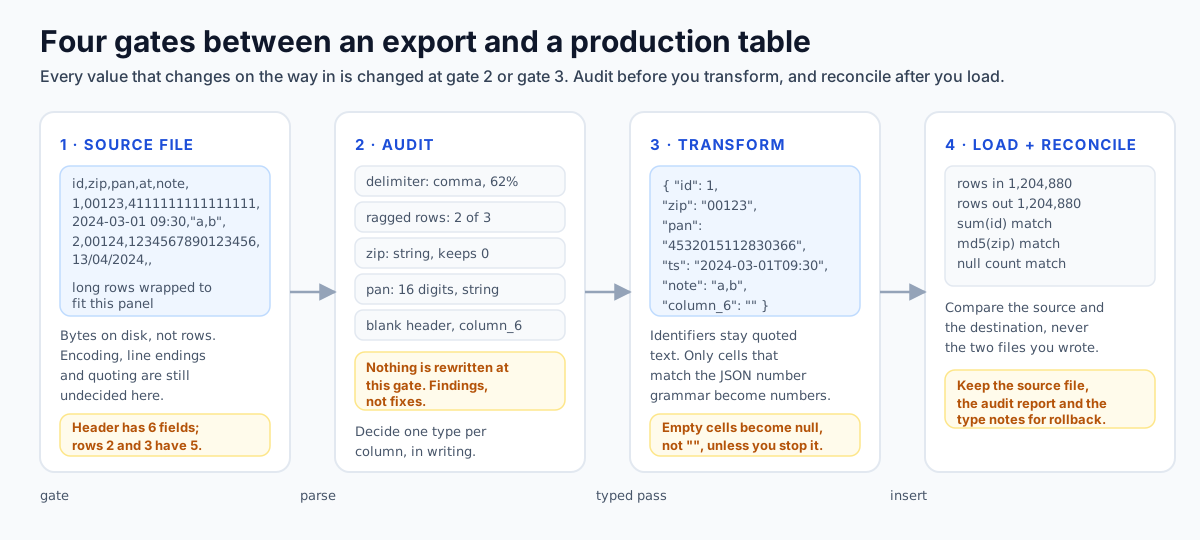
Tabular migrations almost never fail in transit. The transport works, the loader reports success, and the damage is already done because a value changed type somewhere between the export and the column definition. A zip code that arrived as an integer, an account number that arrived rounded to fifteen digits, a blank that arrived as a null: all three are valid rows in the destination table, and none of them raise an error. The first job is therefore not to convert anything. It is to describe the file you have, in writing, before you decide what it should become.
That is the order the tooling assumes. The CSV to JSON converter parses with a state machine, and returns findings and counts alongside the output: which delimiter it settled on and why, the line-ending style, whether the file starts with a byte order mark, the field count of every row, how many cells were quoted, how many contain newlines, which headers repeat, how many rows are ragged, and a per-column type report. Those numbers are the audit. The conversion is a separate decision you make after reading them.
Findings are graded, and the grade matters because only one of them stops the job. Every finding carries a severity of error, warning or info, and a result is considered failed only when at least one error is present. A file whose rows are short is a warning and converts anyway. A file with a duplicated header name is an error, because turning those rows into objects would delete a column. Clean means no errors, not no risk: a file can pass with zero errors and still contain hundreds of warnings. The audit output you archive should be the counts, not a boolean, because the counts are what you compare after the load.
| Gate | Input | Output | Decisions still open |
|---|---|---|---|
| 1. Describe | Source bytes | Delimiter, encoding, line endings, row and column counts, quoting statistics | Which row is the header |
| 2. Audit | Described rows | Ragged rows, duplicate and blank headers, cells that a spreadsheet would rewrite | Destination column types |
| 3. Transform | Typed records | JSON or CSV in the shape the loader expects | Null versus empty string |
| 4. Reconcile | Source and destination | Count, digest and null comparisons, plus a round-trip check | Rollback window |
Gates 1 and 2 never change a value. If a tool rewrites your data while it is still telling you about it, you have lost the ability to compare before and after.
The audit, worked on one extract
Here is the gate table applied to a single file. This extract is an ordinary invoice export: four data rows, seven columns, CRLF endings except on the last line, one city name whose comma was never quoted, one zero-padded zip column, a card token that stopped fitting a double, and a date written the way the reporting tool that produced it likes to write it. Nothing about it is exotic.
invoice_id,customer,city,zip,amount,payment_token,created_at
INV-2024-0117,Müller & Søn,San Francisco, CA,00123,12.50,4532015112830366752,2024-03-01T09:30:00Z
INV-2024-0118,Ø. Nguyen,"Trondheim, Sør-Trøndelag",0100,7,NULL,2024-03-01
INV-2024-0119,Nordvik & A,Augsburg,0009523,1e3,4532015112830366,03/04/2024
INV-2024-0120,Ivan Petrov,Sofia,1000,12.50,
Every line ends CRLF except the last, which ends LF; that is invisible in this rendering and visible in the report. The interesting damage is on line 2, and it is not the value you would guess: the unquoted comma in the city name files everything after it one column early.
lines 5 (header counted)   records 4   columns 7   ragged rows 2
quoted cells 1   cells with newlines 0   line endings mixed   round trip identical
delimiter comma (auto)  reason: counts vary across lines, set it explicitly

error   ragged-row          Line 2 has 8 fields but the header row has 7.
warning ragged-row          Line 5 has 6 fields but the header row has 7.
warning mixed-line-endings  line ending field reads mixed.
warning unsafe-integer      Column "created_at" row 2: 4532015112830366752 is a whole number above 2^53-1.

zip            string (mixed)  examples: 1000   nulls: 0
amount         string (mixed)  examples: 7, 1e3  nulls: 0
payment_token  string (mixed)  examples: 12.50  nulls: 2
created_at     string (mixed)  examples: -      nulls: 1

spreadsheet risk: row 2 column amount  00123  leading zero dropped
spreadsheet risk: row 2 column created_at  4532015112830366752  precision loss
spreadsheet risk: row 3 column zip  0100  leading zero dropped
spreadsheet risk: row 4 column zip  0009523  leading zero dropped
spreadsheet risk: row 4 column payment_token  4532015112830366  precision loss
Findings in severity order, then the per-column type report, then the spreadsheet-risk rows. Four of the seven columns mixed here, and every one of those four is mixed for the same reason.
Two of the findings do the real work, and their severities are the point. Line 2 is an error because it carries eight fields against a seven-column header; line 5 is a warning because it carries six. The short row is the harmless one: the trailing delimiter makes the sixth field an empty cell, the absent seventh is padded as empty, and safe inference turns both into null. The long row is not harmless. A record is built by walking the header list rather than the field list, so the eighth value on line 2 has nowhere to go and is dropped outright: the timestamp is simply gone. Everything after the stray comma sits one column early.
The column report then looks like a typing disaster, and it is not. Four of seven columns resolve to more than one kind because the row shifted, not because the source is ambiguous, which is why a mixed flag is a symptom rather than a decision. And the unsafe-integer finding names created_at, a column nobody intended to hold a card number, which is the audit reporting that a value arrived in the wrong place rather than that it arrived too large.
| Pre-flight check | Who can run it | The signal, or the silence | Pass condition |
|---|---|---|---|
| Duplicate primary key values | You, in SQL, over the extract | The audit checks header names and never key values | A group-by on the key returning no duplicates |
| NULL in a NOT NULL column | The destination, when the cast runs | A null that no converter can tell from a blank | Zero nulls in that column after the load |
| Text that only looks numeric | The per-column type report | string (mixed), plus a long-digit example | One kind per column, or a written exception |
| Values that survive only as text | The spreadsheet-risk rows and unsafe-integer | Leading-zero rows and twelve-digit-or-longer rows | Declared text with a length assertion at load |
| Non-ISO date spellings | You, by casting the column | Nothing: 03/04/2024 is a string like any other | Every value casts, or the export is re-emitted |
| Stray carriage returns | The line-ending and newlines counters | mixed, or a newline count in a column that must not wrap | One ending style, every newline explained |
| Formula-prefixed cells | The spreadsheet-risk rows | A cell starting with = + @ or a minus before a non-number | No findings, or the file never meets a grid |
Checks three, four, six and seven come out of the converters. Checks one, two and five have no browser signal at all, which is exactly why they are the ones missing from most runbooks.
Type decisions: inference, identifiers, timestamps, empties
The inference setting controls a single, very consequential question: does the text in a cell become a JSON number, a JSON boolean, a JSON null, or stay a string? The CSV to JSON converter offers three answers, and the default is deliberately the narrow one. none keeps every cell exactly as it appears. safe converts only what an unambiguous reader would convert. aggressive widens both the boolean and the empty-value rules.
Under safe inference a cell becomes a boolean only if its trimmed text is exactly lowercase true or false. It becomes a number only if the trimmed text matches the JSON number grammar: an optional minus, then either a single zero or a digit one through nine followed by digits, then optional fraction and optional exponent. That grammar is where most of the protection lives. 00123 fails because a leading zero is not valid JSON. +7 fails because there is no plus sign. .5 and 7. fail because both require digits on the other side of the point. 1,000fails because the comma was a field separator, not a thousands mark.
| Cell text | none | safe (default) | aggressive |
|---|---|---|---|
| 00123 | string "00123" | string, leading zero fails the grammar | string |
| 12.50 | string "12.50" | number 12.5, the trailing zero is gone | number 12.5 |
| 1e3 | string "1e3" | number 1000, rewritten without the exponent | number 1000 |
| +7 | string "+7" | string, a plus sign is not valid JSON | string |
| TRUE | string "TRUE" | string, only lowercase is a boolean | boolean true |
| (empty cell) | string "" | null | null |
| N/A | string "N/A" | null, matched against the null token list | null |
| 9007199254740993 | string | string plus an unsafe-integer finding | string plus an unsafe-integer finding |
The null token list defaults to NULL and N/A, compared case-insensitively against the trimmed cell, and is configurable per run. Empty cells become null in both safe and aggressive modes.
Typing is a per-column decision, and the converter reports it that way: for each header it returns the inferred kind, up to two example values, a flag when the column resolved to more than one kind, and a count of nulls. A mixed column is the one to stop on, because it means the same field arrived as different types in different rows and the per-cell rules have already made an irreversible choice about each one. Write the column decision down before you convert: is this a quantity or an identifier, is absence meaningful and if so is it null or empty, and who reads this value after the load.
Leading zeros and the fifteen-digit ceiling
Identifiers are the columns that migrations break most often, and they break in two distinct ways. Short numeric identifiers lose their left side. Long numeric identifiers lose their right side. Both failures happen silently, both are invisible to a schema that declares the column as text, and both are detectable from the cell text alone, which is exactly what the spreadsheet-damage auditor does.
A five-digit US ZIP+4 written as 00123 is not the number one hundred and twenty-three. Neither is a German postal code beginning with zero, the national trunk prefix in a UK phone number, the country-specific part of an IBAN, or a bank account number padded to a fixed width. The auditor flags every cell matching a leading zero followed by more digits, and the recommended remedy is the same in all cases: force the column to text on import, or keep the value quoted so that a numeric reader never sees a bare number.
The right side breaks at the fifteen significant digit ceiling. A double-precision number has a 53-bit significand, so the integers that survive exactly run from minus 2^53 plus one through 2^53 minus one, with 9,007,199,254,740,991 as the top of the range. RFC 8259 leaves range and precision limits to the implementation and names IEEE 754 binary64 as the format that gives the best interoperability, which is why fifteen significant digits is the practical ceiling and not seventeen. That ceiling is what happens to an eighteen-digit card number, and to a snowflake identifier from any modern social platform: sixteen digits fit under the ceiling but the last digit still moves when a spreadsheet formats the column, and seventeen or more digits cross it outright and get rounded to the nearest representable value.
| Identifier | Typical width | What breaks it | Destination type |
|---|---|---|---|
| ZIP and postal codes | 5 to 8, often zero-padded | Leading zero eaten by a numeric read | text, no cast |
| IBAN and BBAN | up to 34 characters, padded sections | Zero padding inside the country-specific part | text, validated by check digits |
| Phone numbers | national format keeps a leading 0 | Trunk prefix dropped on a numeric read | text, E.164 in a separate column |
| GTIN and part numbers | 8, 12, 13 or 14 digits | Indicator zero dropped; 14 digits reformatted | text with a fixed width |
| Card PAN | 16 to 19 digits | Rounded above fifteen digits, then exponent-formatted | tokenised, never a number |
| Snowflake and database ids | 18 to 19 digits | Last two to three digits rewritten by a double | text or 64-bit integer, not double |
| Account and cost-centre codes | 6 to 10, zero-padded | Left padding lost, right padded with zeros on read | text |
The pattern is consistent: an identifier is a fixed-width string that happens to look like a number. Type it as text and validate the checksum in the destination, not in the converter.
Timestamps without offsets
None of the three formats in this migration has a date type. CSV has no types at all. JSON has numbers, strings, booleans and null. YAML 1.2 core has integers, floats, booleans, null and strings, and nothing else. A timestamp is therefore always a string in transit, and the question you are answering when you write one is not what format to use but what the reader is allowed to assume.
A value like 2024-03-01T09:30:00 with no designator is a local wall-clock time, and whose wall clock is decided by whoever parses it. The ISO 8601 profile used across the Web is explicit that a complete time is given either with the UTC designator or with a numeric offset from UTC; the version without either is a local time, which is only meaningful together with the zone the writer was standing in. That is fine for a date of birth and useless for an event log, because a local time cannot be sorted across a daylight-saving boundary and cannot be compared across regions. Locale-formatted strings are worse, for a different reason: they are ambiguous rather than merely under-specified. 03/04/2024 is a valid date in two orders of magnitude apart in meaning, and a spreadsheet will happily pick one and store a serial number.
If the same data ends up in a YAML document, an unquoted date is resolved by a YAML 1.1 reader as a timestamp, and the scalar-classification report marks it high risk, because what comes back out of that round trip is not the text you wrote. Under YAML 1.1 an unquoted 12:30 is a sexagesimal integer, and resolves to seven hundred and fifty. The YAML to JSON converter reports both of these as implicit resolutions with the 1.1 answer and the 1.2 answer side by side.
| Value as written | What a strict ISO reader gets | What a locale or YAML 1.1 reader may get | Safe move |
|---|---|---|---|
| 2024-03-01T09:30:00Z | an instant, unambiguous | an instant | store as timestamptz |
| 2024-03-01T09:30:00+02:00 | an instant with an offset | same instant, re-rendered in local zone | keep the offset in the text |
| 2024-03-01 09:30:00 | a local time, zone from the parser | a rejected value, or a local time | add the zone at export time |
| 2024-03-01 | a calendar date | a timestamp at midnight in an assumed zone | quote it in YAML, cast on purpose |
| 03/04/2024 | nothing, it is not ISO | day-first or month-first, then a serial number | re-emit as ISO from the source |
| 12:30 | a time | in YAML 1.1: the integer 750 | always quote clock times |
A timestamp column should record both the instant and the zone it was captured in if you ever intend to reason about the difference between the two.
Empty string, null, and the key that is not there
Three states that mean different things in a relational model collapse into two in CSV and into one in a default conversion. Absent, empty and null are not synonyms, and a migration that does not choose which of them a blank cell means will pick for you. This is the single most common reason a load finishes and a report then disagrees with the source system.
On the read side, the parser builds every record from the header list, so a row that is short of fields gets an empty value for each missing position rather than a missing key. Then inference runs, and an empty cell becomes null in both safe and aggressive modes, so that blank and missing are now indistinguishable from each other and from the literal text NULL, which the default null-token list also converts. On the write side the collapse goes the other way: a null and an empty string both serialise to an empty field, unquoted, because RFC 4180 quoting is only required when the field contains a delimiter, a quote or a newline.
Loaders do have a convention, and it is worth converting to deliberately rather than by accident. PostgreSQL treats an unquoted empty string as the null marker in CSV format, and an actual empty value is written by it as a quoted empty pair; you can force the opposite reading with FORCE_NOT_NULL, or force quoted empties to become nulls with FORCE_NULL. MySQL reserves backslash-N for null, reads an empty field as an empty string for text columns and as zero for numeric columns. Both of those behaviours are documented, and neither of them is what a browser converter emits by default.
| Source state | After CSV to JSON, safe mode | After JSON to CSV | Readable again as |
|---|---|---|---|
| cell present and empty | null | empty field, unquoted | null in Postgres by default |
| field missing (short row) | null | empty field, unquoted | indistinguishable from a blank |
| cell containing NULL | null, via the null token list | NULL | text unless the token list is cleared |
| cell containing N/A | null, via the null token list | N/A | text unless the token list is cleared |
| JSON null | not applicable | empty field, unquoted | null |
| JSON empty string | not applicable | empty field, unquoted | null, unless quoted |
| key absent from the object | not applicable, the key is always present | empty field | a heterogeneous-records note |
The converter emits an info finding when records do not all have the union of columns, precisely because those missing keys become empty cells that a reader may interpret as null or as empty strings.
Structural hazards: ragged rows, headers, encoding
RFC 4180 is short and, for anyone moving production data, disappointingly thin. It fixes records to CRLF-delimited lines, says a field must be quoted when it contains a delimiter, a quote or a newline, says quotes inside a quoted field are doubled, and says leading and trailing whitespace is significant. It says nothing about character encoding, nothing about types, nothing about header rows, nothing about duplicate names and nothing about what a parser should do when the field count varies. The state machine in these tools implements the standard and then reports everything the standard leaves undecided.
Every data row is compared against the header width. Short rows produce warnings, long rows produce errors, and only the first eight are itemised before the report switches to a summary count, because a file with a systematic quoting bug would otherwise produce ten thousand identical lines. The hint attached to a long row is the diagnosis: extra fields are almost always unquoted delimiters inside free text, a city written as San Francisco, CA or a job title with a comma, silently split into two columns and shifting everything after it.
Headers get three separate findings. An empty header is renamed to a positional column and reported as a warning. A duplicate header name is an error, because object keys are unique while CSV columns are positional, and the last value under a repeated name would win. An all-digit header is info, and it is usually the tell that the file lost its header line and the first data row was read as one. Quoting bugs have their own codes: a quote that appears mid-field rather than at a field boundary, and text following a closing quote, both of which other parsers may truncate. An unterminated quote is an error and explains itself, because everything after that quote is consumed as one field.
| Code | Severity | What it costs you | Action before loading |
|---|---|---|---|
| unterminated-quote | error | Every row after the open quote is one field; row counts are meaningless | Fix the writer, or re-export |
| duplicate-header | error | One column survives per repeated name, the rest is deleted | Rename columns, or keep array shapes |
| ragged-row (long) | error | Values shift right; everything after the stray delimiter is misfiled | Quote the free-text column |
| ragged-row (short) | warning | Missing positions filled as empty | Confirm emptiness is acceptable |
| blank-header | warning | Column renamed to a positional name in the output | Rename it deliberately |
| numeric-header | info | The header line may be missing entirely | Toggle the header option and re-check |
| mixed-line-endings | warning | Split-on-newline parsers mis-read quoted newlines | Normalise to one style |
| control-characters | warning | Vertical tab and form feed break readers and are replaced by spreadsheets | Strip or escape |
| bom | info | The first header name arrives with a zero-width prefix | Strip before ingesting |
Codes are stable strings attached to each finding, so an audit can be diffed between two exports of the same report.
BOM, Windows-1252 and mojibake
By the time text reaches a converter, it has already been decoded once. Whatever the decoder assumed is now baked into the characters, and no amount of re-encoding later will undo a wrong assumption. Character problems in a migration are therefore mostly forensic: you are identifying what happened, not fixing it, and the fix belongs either in the export settings or in the read.
A UTF-8 file that begins with the bytes EF BB BF is reported by the CSV parser as info, with a note that describes the whole dilemma: Excel on Windows wants the mark in order to read a UTF-8 CSV correctly, RFC 4180 does not define it at all, and most server-side readers treat it as part of the first header name, producing a column literally prefixed with a zero-width no-break space. JSON is stricter, because RFC 8259 requires UTF-8 for text exchanged between systems and says implementations must not add a byte order mark. Mojibake is a decoding decision, not an encoding one: a file written as Windows-1252 and read as UTF-8 produces replacement characters and is usually rejected outright; the reverse, UTF-8 bytes read as a legacy single-byte code page, produces text that looks plausible and is wrong.
| Symptom | Likely cause | What the audit shows | Correct intervention |
|---|---|---|---|
| First column name has an invisible prefix | UTF-8 BOM written by Excel | a bom finding on the CSV, a utf8-bom warning on JSON | Strip the mark at export, or before load |
| Accented letters arrive as two characters | UTF-8 bytes read as Windows-1252 | longer cell lengths than the source, odd code points | Re-read with the right decoding |
| Question marks replace characters | Legacy code page could not represent the character | nothing, it is silent | Re-export from the source in UTF-8 |
| Parser reports an unexpected character | BOM at the start of a YAML stream | a bom warning with the loader explanation | Remove the mark or use a loader that skips it |
| Random whitespace errors in JSON | No-break space pasted from a document | an invalid-whitespace error with the code point | Re-type the value, do not paste it |
| Values changed to boxes or spaces on reopen | Control characters kept in a cell | a control-characters count | Strip on write, not on read |
Declare the encoding on both ends of the pipeline. An undeclared UTF-8 file is a rumour, and the spreadsheet you open it with decides the truth.
Normalisation: values that only look identical
Everything so far assumes a wrong value, one that changed. This section is about a value that has not changed and still does not match: two strings that render as the same characters, describe the same customer, and are not equal. Two distinct mechanisms produce that state, and they get confused constantly, because neither of them is visible on screen and only one of them looks like damage.
Canonically equivalent is not binary equal
Unicode Standard Annex #15, Normalization Forms, defines NFD as canonical decomposition and NFC as canonical decomposition followed by canonical composition, and states the purpose plainly: normalisation exists so that equivalent strings have a unique binary representation. The pair that breaks migrations is an accented name. A word spelled with the precomposed code point U+00E9 is four characters and five UTF-8 bytes. The same word spelled with a plain ASCII e followed by combining acute accent U+0301 is five characters and six bytes. Both are correct Unicode. Both render identically in every font, in every browser, and in the cell of every spreadsheet you will ever compare them in.
Nothing in these converters normalises anything. None of the engines calls a normalisation function, so code points arrive and leave unchanged, which is the right behaviour for a migration tool and a surprise for anyone who hoped a format conversion would tidy the data on the way through. The consequences are mechanical. A digest is a function of bytes, so an order-independent per-column digest reports a mismatch between two rows nobody touched. A unique index under a binary collation admits both spellings as separate rows, so the distinct-value count rises after a load that was supposed to be a copy of itself. A length assertion written against one form fails on the other, and a join on a name column quietly becomes a partial join.
[
  { "customer": "René Café" },
  { "customer": "René Café" }
]
Line 2 uses a plain letter plus combining accents; line 1 uses precomposed letters. Rendered, they are the same two words. As bytes they differ, and so do their digests, their lengths and their distinct counts.
The same byte, two alphabets
The second mechanism is single-byte ambiguity. Windows-1252, the Western code page that Windows and its tooling have defaulted to for decades, puts the right single quotation mark at byte 0x92; an export dialog whose only plain-text encoding option says ANSI is usually describing something in that family. ISO 8859-1, what most engineers mean by latin-1, has nothing printable at that position: 0x80 through 0x9F are C1 control codes there. The MySQL documentation states the collision outright: MySQL's latin1 is the same as the Windows cp1252 character set, and where IANA latin1 treats the code points between 0x80 and 0x9f as undefined, cp1252 assigns characters to them, 0x80 being the euro sign.
So an apostrophe written as 0x92 has three possible futures. Read as cp1252 it is an apostrophe. Read as ISO 8859-1 it is a C1 control character that still occupies one cell, joins to nothing, and prints as a gap or as nothing at all. Read as UTF-8 it cannot be read, because 0x92 is a continuation byte with no lead byte in front of it, and a strict decoder stops on the spot. The middle outcome is the dangerous one: it is silent, it preserves the character count, and every row-level check still passes.
| What appears in the data | The bytes that produced it | How it was misread | What to re-run |
|---|---|---|---|
| ’ where an apostrophe belongs | E2 80 99, the UTF-8 form of U+2019 | cp1252 holds â at 0xE2, € at 0x80 and ™ at 0x99 | Re-read the same file as UTF-8 |
| “ where a left quote belongs | E2 80 9C, the UTF-8 form of U+201C | Same route, with œ at 0x9C | Re-read the same file as UTF-8 |
| é where é belongs | C3 A9, the UTF-8 form of U+00E9 | à at 0xC3, © at 0xA9 | Re-read as UTF-8 |
|  at the head of the first header | EF BB BF, the UTF-8 byte order mark | Three cp1252 letters instead of one mark | Strip the mark before ingesting |
| A gap where a curly quote used to be | A lone 0x92 read as ISO 8859-1 | That position is a C1 control character there | Re-read declaring cp1252 explicitly |
| Question marks replacing accented letters | Nothing: the character was never written | The writer targeted a code page without it | Re-export from the source |
Length is the tell. UTF-8 read through a single-byte table makes strings longer by one or two characters per non-ASCII letter; a legacy byte read as UTF-8 makes the decoder stop rather than guess.
Two digests, not one
The fix is not to normalise the data. It is to normalise the comparison, twice, and keep both results. Run one per-column digest over the text exactly as it arrived, which proves nothing changed in transit. Run a second over the same column forced into the form you decided on, which proves the values agree once the form question is out of the way. A mismatch that shows up only in the first pair is two systems disagreeing about what a character is. A mismatch that survives both pairs is a data change, and it is yours to explain in writing. Then record the decision where the schema cannot hide it: this destination column is NFC, or this destination column is whatever the source sent, byte for byte. Leaving it undecided is the actual failure mode.
Reconciliation and round trips
Reconciliation is the only gate that can tell you whether the migration worked, and the mistake to avoid is comparing the wrong two things. Comparing your exported file with your loaded table tells you whether the loader was faithful. Comparing the source system with the loaded table tells you whether the migration was. Do both, in that order, and record the numbers.
Start with the cheap checks the converters already expose: the row count of the parsed file against the record count of the JSON, the header field count against the widest row, the number of quoted and multi-line cells, and the total of ragged rows. Then check counts inside the destination: rows per partition or per day if the source has a natural partition, null counts per column against the audit's per-column null tally, and distinct-value counts for every column you expect to be an enumeration. A distinct count that changes is a typing problem, because numbers and text compare differently.
Per-column digests are what catch value changes that counts cannot. Two properties matter. First, digest the text of the column as exported, not the value after a numeric cast, otherwise you are comparing two lossy representations and calling it a match. Second, make the digest order-independent where the load does not preserve order: aggregate the per-row hashes with a commutative operation, or sort before hashing, so a legitimate difference in row order does not look like corruption. For the columns identified as at-risk in the previous section, also compare string length distributions, because rounding a fifteen-digit value does not change the count of rows, it changes the number of nines.
The encoding step deserves its own check because it is where most of the converters' logic lives. Convert to JSON, convert back to CSV, and compare the reconstructed rows against the originals; the JSON to CSV converter tells you which shape it detected, how many columns it wrote, whether records lacked the union of columns, how many paths it flattened, and how many cells were JSON-encoded rather than scalar. The CSV to JSON result carries a flag that confirms the generated document re-parses, which is a weaker check than a full round trip and a good one to run on every file before you look at the content.
| Check | Compute | Pass condition | Catches |
|---|---|---|---|
| Row count | Rows in the file against rows in the table | exact equality | dropped or duplicated rows, unterminated quotes |
| Column count | Header width against the widest row, plus the union of JSON keys | no unexplained growth | unquoted delimiters in free text |
| Null tally | Per column, from the type report and from the destination | exact equality per column | blank versus missing collapses |
| Digest | Order-independent hash of each column as text | exact equality | rounding, truncation, re-encoding |
| Length profile | Count per character length on identifier columns | exact equality | leading-zero loss, scientific notation |
| Boundary rows | First, last and one row per day or partition | field-by-field equality | off-by-one and sort-order bugs |
| Round trip | Convert out, convert back, compare | byte equality on the fields you care about | writer quoting and flatten decisions |
Sign the migration with numbers, not with a sentence. If the record of the load contains seven counts and a digest, the next person can rerun it.
When the file is bigger than the tab
These converters hold the entire input text, the parsed model and the output document in memory at the same time, which means the working set is several times the size of the file. That is the right trade for the job they do: audit a real export interactively, see every finding, nothing leaves the machine. It is the wrong trade for a two-gigabyte extract, where the tab dies before the audit finishes and you have no report at all.
Judge it by rows and width, not just bytes. A million rows by a dozen short columns is a very different object from a hundred thousand rows containing free-text descriptions with embedded newlines, because each parsed record is an object with keys, and the strings in it outlive the file. Practical approach: audit a head of the file in the browser, get the findings and the type decisions, and only then move the bulk load to a streaming reader. If the audit on the first ten thousand rows finds structural problems, the whole file has them.
Miller reads and writes CSV, TSV, JSON and JSON Lines, and processes records one at a time so the input size does not have to fit in memory; it is also untyped by default, which is the same decision as turning inference off. PostgreSQL and MySQL can load a delimited file directly, which skips the intermediate document entirely and gives you the transaction, the reject limit and the constraint checking in the same statement. Use the browser converters for the audit and the awkward conversions, and the loaders for the bulk.
| Step | Do it in the browser | Do it outside the browser | Why |
|---|---|---|---|
| Structural audit | Yes, on a head of the file | awk and grep for a full-file field count | Findings are qualitative; sampling is enough |
| Type decision | Yes, per column with the report | encode it in the destination schema | One written decision, many readers |
| Full conversion | up to a few hundred megabytes | Miller, or the loader of the destination | Memory, and transactional error handling |
| Load | download and upload by hand for small files | COPY or LOAD DATA with explicit options | Reject limits, and NULL semantics you can set |
| Reconciliation | Round trips and small comparisons | SQL aggregates and digests over the table | The check must run where the data lives |
Nothing about the rules changes with size. A ragged row is a ragged row whether the file is 20 KB or 2 GB; only the tool has to change.
Pre-flight checklist and rollback
A migration runbook is short or nobody follows it. Everything in this page reduces to the checks below, in order, with a number recorded next to each. If a check cannot be expressed as a number, it is a note rather than a check.
| # | Check | Where it is visible | Pass condition | Stop if |
|---|---|---|---|---|
| 1 | Encoding and BOM | bom finding on the CSV, utf8-bom warning on JSON | declared and stripped | the header names look odd |
| 2 | Delimiter | the detection reason string | stated with a consistency figure | the report says the data is ambiguous |
| 3 | Line endings | the line-ending field | one style, CRLF or LF | mixed or CR-only |
| 4 | Header row | blank, duplicate and numeric-header findings | no duplicate names, intentional blanks | any duplicate |
| 5 | Field counts | ragged-row count and per-row counts | zero ragged rows, or an explained list | long rows you cannot attribute |
| 6 | Quoting integrity | unterminated-quote, text-after-closing-quote | no errors | a quoted field opened and never closed |
| 7 | Embedded newlines | multi-line and embedded newline counts | expected for the free-text columns only | a count in a code column |
| 8 | Identifier columns | leading-zero and long-digit rows | typed as text, with a length assertion | a cast to numeric in the schema |
| 9 | Numeric columns | per-column type report and mixed flag | one kind per column, nulls explained | string (mixed) |
| 10 | Null versus empty | null token list and the loader option | one representation per column | both meanings present |
| 11 | Timestamps | quoted in YAML, offset present in text | zone explicit | locale-formatted dates |
| 12 | Spreadsheet safety | the damage audit and formula-prefix rows | no findings, or the file never meets a grid | a cell starting with = + - or @ |
| 13 | Grid limits | row and column counters | under 1,048,576 rows and 16,384 columns | either counter exceeded |
| 14 | Round trip | re-parsed flag and the reverse conversion | fields identical | anything changed |
| 15 | Reconciliation | counts, digests and length profiles | all equal against the source system | one mismatch |
Checks 1 to 7 are structural and belong to the file. Checks 8 to 13 are semantic and belong to your schema. Checks 14 and 15 are the sign-off.
Rollback
Rollback for a migration is not a restore, it is the ability to show what the data said before. Keep four artefacts for every run: the source file as exported, unmodified, with its own checksum; the audit report including the counts rather than a pass flag; the written column-type decisions; and the load statement with its options. With those four you can rebuild the destination table from the source, prove a specific cell was correct before, and answer the question that actually gets asked, which is not how do we roll back but when did this value change. Then make the load reversible in the database rather than in the files: write to a shadow table, run the reconciliation set against the production table, and swap names inside a transaction. A migration that cannot be re-run from the source is not a migration, it is an edit.
- audit report
- The counts and findings produced from the file as it is, before any value is retyped. Archived next to the file, and the baseline for every later comparison.
- safe inference
- Type conversion limited to what an unambiguous reader agrees on: lowercase booleans and canonical JSON numbers, with big and padded values kept as text.
- ragged row
- A record whose field count differs from the header. Short rows warn and are padded; long rows error and usually mean an unquoted delimiter.
- order-independent digest
- A per-column hash built so that reordering rows does not change the result, which is what makes it usable against a table with no stable sort.
- round trip
- Converting out and back again and comparing fields. It proves the encoding step, not the load, and catches writer decisions that change text.
- shadow load
- Writing to a new table and swapping names in a transaction, so a failed reconciliation is a rollback rather than a repair.
Answers
Questions about migrating data between systems
Why did my zip codes lose their leading zero?
Type inference drops it if the value is converted to a number; safe inference keeps anything matching 0123456 as a string because the JSON number grammar forbids leading zeros. The other thief is a spreadsheet double-click. Force the column to text on import, or write with numeric-safe quoting.
How many digits are safe in JSON?
Whole numbers up to 9,007,199,254,740,991 (2^53 minus 1) are exact in IEEE-754 binary64. Treat fifteen significant digits as the portable ceiling. Numbers above it are kept as text and reported with an unsafe-integer warning.
Can these browser tools handle a two gigabyte file?
No. Each converter keeps input, parsed model and output in memory, so the working set is several times the file size. Split by row blocks with the header repeated, audit each block, then load with a streaming reader such as PostgreSQL COPY or Miller.
How do I prove nothing was lost?
Reconcile against the source system, not against the file you generated. Compare row counts, per-column null counts, distinct-value counts and an order-independent digest of each column. Then prove the encoding step separately by round-tripping.
Related
Next up
Sources and further reading
- [1]RFC 4180: Common Format and MIME Type for CSV Files — The record and field rules every parser here implements: CRLF delimited records, quoting only when a field contains a delimiter, quote or newline, doubled quotes as the escape, and whitespace being significant. (accessed November 12, 2026)
- [2]RFC 8259: The JavaScript Object Notation (JSON) Data Interchange Format — Section 6 on range and precision limits and IEEE 754 binary64 interoperability, section 4 on unique names, and section 8 requiring UTF-8 and forbidding a byte order mark on JSON text sent between systems. (accessed November 12, 2026)
- [3]MDN: Number.isSafeInteger() — The safe integer range, minus 2^53 minus 1 to 2^53 minus 1 inclusive, and the exact bound 9,007,199,254,740,991 used by the big-integer diagnostic. (accessed November 12, 2026)
- [4]Excel specifications and limits — The worksheet grid limit of 1,048,576 rows by 16,384 columns, the 32,767 character cell ceiling and the fifteen digit numeric precision behind the spreadsheet-damage audit. (accessed November 12, 2026)
- [5]PostgreSQL: COPY — CSV format defaults: the null string is an unquoted empty string, FORCE_NOT_NULL and FORCE_NULL change how quoted and unquoted empties are read, and ON_ERROR with REJECT_LIMIT controls discarded rows. (accessed November 12, 2026)
- [6]MySQL: LOAD DATA — How an empty field differs from a missing field, the backslash-N null token, and why quoted empty values and the word NULL are interpreted differently depending on the ENCLOSED BY clause. (accessed November 12, 2026)
- [7]Miller (mlr) documentation and README — A streaming CSV, TSV and JSON processor that handles records one at a time and defaults to untyped, all-string field handling, which is the command-line equivalent of turning inference off. (accessed November 12, 2026)
- [8]W3C: Date and Time Formats — The ISO 8601 profile used on the Internet: the T separator, and a time zone given either as the UTC designator or as a numeric offset. (accessed November 12, 2026)
- [9]Ziemann, Eren and El-Osta: Gene name errors are widespread in the scientific literature — The 2016 audit of leading genomics journals that found roughly one fifth of papers with supplementary Excel gene lists contained a spreadsheet-induced conversion of a gene symbol into a date or a number. (accessed November 12, 2026)
- [10]Unicode Standard Annex #15: Unicode Normalization Forms — The definitions used in the normalisation section: NFD is canonical decomposition, NFC is canonical decomposition followed by canonical composition, and the stated purpose is that equivalent strings get a unique binary representation. (accessed November 12, 2026)
- [11]Unicode: cp1252 to Unicode mapping table — The byte table behind every mojibake signature in this page: 0x92 to U+2019, 0x80 to U+20AC, 0x99 to U+2122, 0x9C to U+0153, and the five positions 0x81, 0x8D, 0x8F, 0x90 and 0x9D that cp1252 leaves undefined. (accessed November 12, 2026)
- [12]MySQL Reference Manual: West European Character Sets — The statement that MySQL latin1 is the same as the Windows cp1252 character set, that IANA latin1 treats 0x80 to 0x9f as undefined while cp1252 assigns characters there, and how MySQL maps the five undefined positions to C1 code points. (accessed November 12, 2026)